
7 IT Support Models for Small Businesses, Ranked (2026)
Not sure which IT support model fits your business? TeraHost provides managed and co-managed IT support for businesses across Manchester and Salford. See our Managed IT Services →
Every business needs IT support, but there’s more than one way to get it. Some businesses call someone when something breaks. Some hire their own IT person. Others pay a provider a fixed monthly fee to look after everything. Each IT support model suits a different kind of business, and choosing the wrong one usually shows up as surprise bills, slow fixes or security gaps nobody noticed.
Below we rank the seven most common IT support models for small and medium-sized businesses in the UK, from the one that suits most growing businesses best to the one that causes the most problems. We’re a managed service provider ourselves, so we’ve been upfront about where each model genuinely fits, including the cases where managed IT isn’t the right answer.
How we ranked them
We scored each model on the things that matter most to a business with roughly 5 to 150 staff:
- Cost predictability: can you budget for it, or does it arrive as surprise invoices?
- Prevention: does anyone fix problems before they stop your staff working?
- Security: are updates, backups and protection actually checked, or just assumed?
- Speed and cover: how quickly does help arrive, and what happens when someone is off sick or on holiday?
- Knowledge: does whoever supports you understand your setup, or start from scratch each time?
IT support models compared at a glance
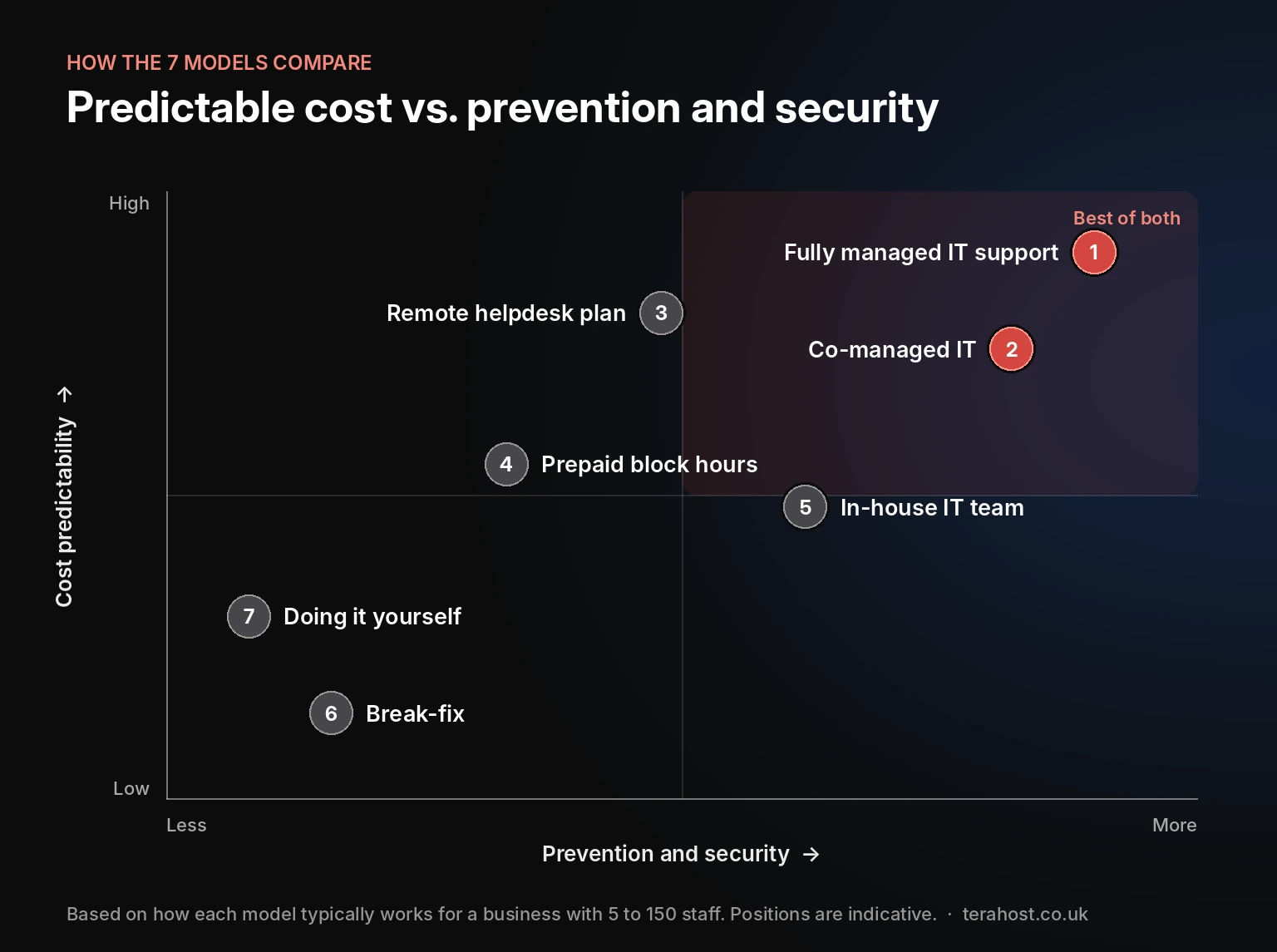
| Rank | Model | Cost predictability | Prevention and security | Best for |
|---|---|---|---|---|
| 1 | Fully managed IT support | High | High | Most businesses with 5–150 staff |
| 2 | Co-managed IT | High | High | Businesses with an in-house IT person or team |
| 3 | Remote helpdesk plan | High | Medium | Small, cloud-based teams with simple setups |
| 4 | Prepaid block hours | Medium | Low to medium | Light, occasional support needs |
| 5 | In-house IT team | Medium | Varies | Larger businesses with complex in-house systems |
| 6 | Break-fix (pay as you go) | Low | Low | Very small businesses with almost no IT |
| 7 | Doing it yourself | Low (hidden cost) | Low | Nobody for long |
1. Fully managed IT support
With managed IT support, an IT provider looks after your whole setup for a fixed monthly fee, usually charged per user. That normally covers a helpdesk your staff can call, remote and on-site support, monitoring of your devices and servers, security updates, backup checks and Microsoft 365 administration. Because the provider is paid the same whether things break or not, its incentive is to stop problems happening in the first place.
Best for: most businesses with roughly 5 to 150 staff that rely on their computers, email and data every day and don’t have their own IT team.
- Pros: predictable monthly cost; problems often caught before staff notice; security, updates and backups handled as routine; one team that knows your setup; scales up or down as you hire.
- Cons: you pay every month, including quiet months; quality varies a lot between providers, so check what’s included and how quickly they respond.
Verdict: the best all-round model for most small and medium businesses. If you’re new to it, our guide What Is Managed IT Support for Business? explains how it works in more detail.
2. Co-managed IT
Co-managed IT splits the work between your own IT person or team and an outside provider. Typically your in-house staff handle day-to-day requests and the things that need local knowledge, while the provider supplies the tools, out-of-hours cover, security monitoring, backup management and specialist skills that are hard to keep in-house.
Best for: businesses that already employ an IT person or a small team and want to strengthen it rather than replace it.
- Pros: keeps your in-house knowledge; covers holidays, sickness and staff leaving; gives your IT person enterprise-grade tools and a team to escalate to; usually cheaper than hiring more IT staff.
- Cons: needs clear agreement on who does what, or tasks fall between the gaps; you’re still paying for in-house staff on top.
Verdict: the best choice if you already have IT staff. It ranks just below fully managed only because fewer businesses have an in-house IT person to build around.
3. Remote helpdesk plan
A remote helpdesk plan gives your staff a number to call and an inbox to email, and an engineer fixes problems by connecting to their computer remotely. It’s usually a fixed monthly fee, but it covers less than full managed support: often no on-site visits, limited proactive monitoring and little strategic advice.
Best for: small teams that work mostly in the cloud, such as Microsoft 365 with no office server, and whose problems can almost always be fixed remotely.
- Pros: lower monthly cost than full managed support; fast fixes for everyday problems; predictable budget.
- Cons: reactive by nature, so it fixes problems rather than preventing them; hardware faults, network problems and office moves still need someone on site; security and backups may not be checked unless you pay extra.
Verdict: a sensible starting point for very lean, cloud-based teams, as long as you’re clear about what isn’t covered.
4. Prepaid block hours
With block hours you buy a bundle of support time up front, say 10 or 20 hours, and the provider deducts time as they work. When the hours run out, you top up.
Best for: businesses with light, occasional IT needs that want a trusted provider on hand without a monthly contract.
- Pros: you only pay for time you use; usually a better hourly rate than ad-hoc call-outs; no long commitment.
- Cons: the meter is always running, so staff hesitate to ask for help and small problems grow; nobody is paid to keep an eye on things between requests; a single bad month can use up the whole block.
Verdict: better than pure pay-as-you-go, but it still rewards fixing over preventing.
5. In-house IT team
You employ your own IT staff, from a single IT manager to a full department, who work only for your business.
Best for: larger businesses, or those with complex, specialist systems that need someone on site every day.
- Pros: someone in the building who knows your business inside out; full control over priorities; instant face-to-face help.
- Cons: salary, training, tools and recruitment add up quickly; one person can’t be an expert in everything from networking to cyber security; no cover when they’re off; knowledge walks out of the door when they leave.
Verdict: right for some larger organisations, but for most small businesses a single IT employee is expensive and stretched thin. Many get the best of both by pairing them with a provider (see co-managed IT above). We compare the two approaches in more depth in In-House IT vs Outsourced.
6. Break-fix (pay as you go)
Break-fix is the traditional model: when something stops working, you call an IT company or freelancer, they fix it and send an invoice for the time.
Best for: very small businesses with only a couple of computers and almost nothing that would stop them trading if it failed.
- Pros: nothing to pay when nothing goes wrong; no contract.
- Cons: costs are unpredictable and often highest at the worst moment; nobody checks updates, security or backups between call-outs; whoever turns up may not know your setup; urgent help depends on who’s free.
Verdict: it looks cheap until something serious happens. The provider only gets paid when things go wrong, which is the opposite of what you want.
7. Doing it yourself
Plenty of businesses rely on an “accidental IT person”: the owner, the office manager or whoever is good with computers, fitting IT around their real job, with a search engine and a lot of patience.
Best for: getting started, but nobody for long.
- Pros: no invoices; someone who knows the business.
- Cons: it takes a valuable person away from their actual job; security settings, backups and licences are often set up once and never checked again; there’s no one to call when it goes badly wrong.
Verdict: the most expensive option once you count lost time and risk, even though it never shows up on an invoice.
Which IT support model is right for your business?
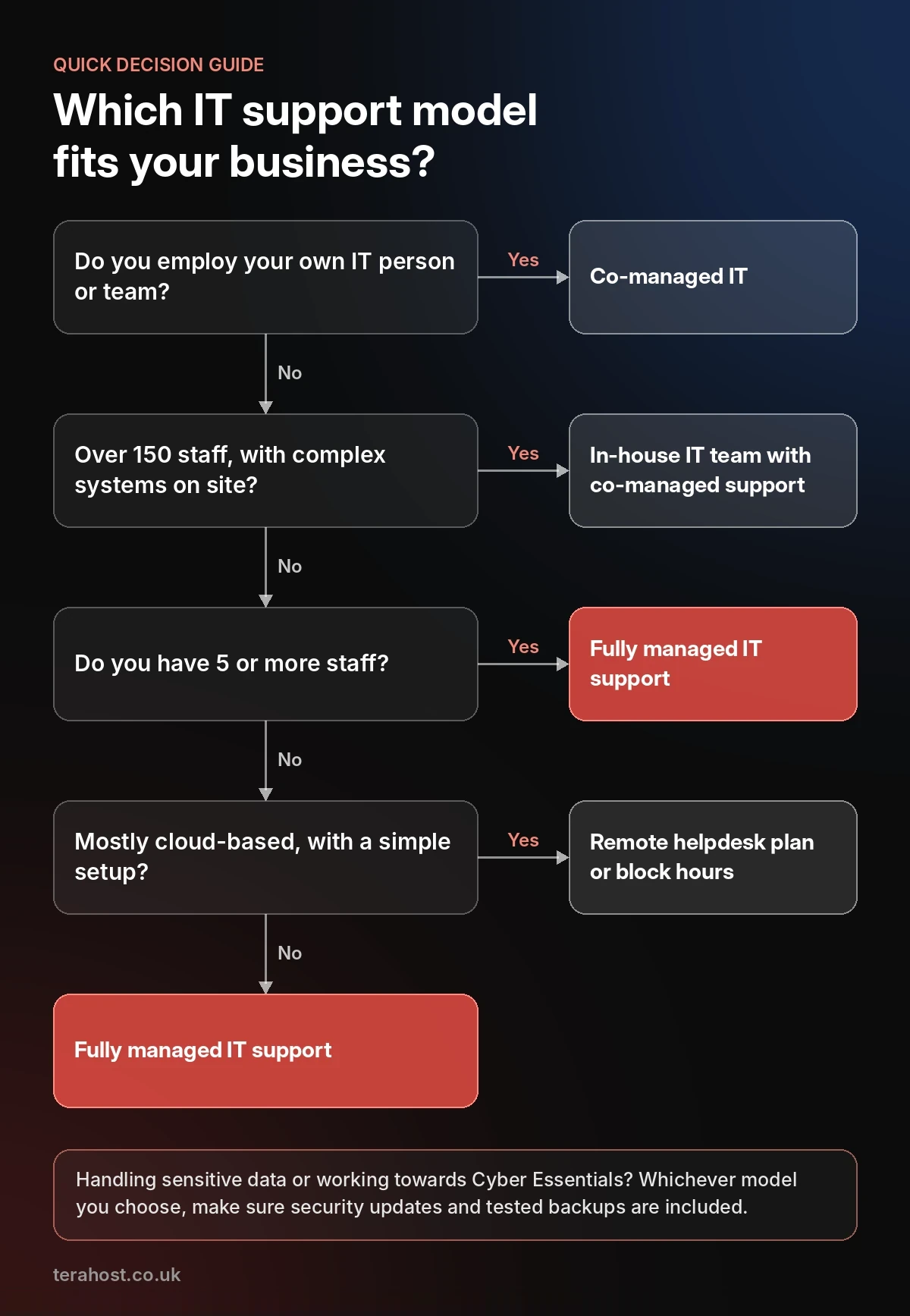
- 1 to 4 staff, mostly cloud-based: a remote helpdesk plan or block hours can work, but make sure someone is checking your backups and security.
- 5 to 150 staff, no IT team: fully managed IT support. This is where it pays for itself fastest.
- Any size with an IT person or team: co-managed IT, to give them backup, tools and cover.
- Regulated or sensitive data (such as dental and healthcare practices, or anyone handling client records): choose a model where security, patching and tested backups are included as standard, not extras. See our Dental IT Support service for an example.
- Working towards Cyber Essentials: you’ll need devices patched, supported and secured consistently, which is much easier with a managed or co-managed model. See Cyber Essentials.
Signs you’ve outgrown your current IT support
- Your IT bills are different every month, and the big ones arrive after emergencies.
- The same problems keep coming back.
- Nobody can tell you for certain when your backups were last tested.
- Staff put up with slow or broken equipment rather than ask for help.
- One person holds all the passwords and knowledge.
If several of those sound familiar, it may be time for a change. Moving to a new model or provider is less disruptive than most people expect. Here’s how switching IT provider works.
Frequently asked questions
What is the most common IT support model for small businesses?
Managed IT support, where a provider looks after your IT for a fixed monthly fee, has become the most common model for small and medium businesses that rely on technology every day. Very small businesses often still use break-fix or block hours.
What’s the difference between managed and co-managed IT?
With managed IT, the provider handles everything. With co-managed IT, the work is shared between the provider and your own in-house IT staff, with each side agreeing which tasks it owns.
Is managed IT support worth it for a small business?
For most businesses with five or more staff, yes. The fixed cost is usually lower than the combined cost of downtime, emergency call-outs and staff time lost to IT problems, and you get security and backups checked as routine. For a very small business with minimal IT, a lighter model may be enough.
Can we switch IT support model partway through a contract?
Usually, yes. Check your current notice period first. A good provider will plan the move around it and handle the handover from your old provider, so there’s no gap in support.
How much does IT support cost for a small business?
It depends on the model. Managed IT support is usually charged as a fixed monthly fee per user or per device, so the cost grows with your team. Block hours are paid up front, and break-fix is charged by the hour when something goes wrong, which is cheaper in a quiet month but can be expensive after a serious problem. When comparing quotes, check exactly what’s included rather than just the headline price.
What’s included in managed IT support?
It varies between providers, but a good managed IT service usually includes a helpdesk for your staff, remote and on-site support, monitoring of your computers and servers, security updates, antivirus or endpoint protection, backup checks and Microsoft 365 administration. Ask for a clear list of what’s included and what costs extra, such as new equipment, projects or out-of-hours work.
What’s the difference between IT support and managed IT services?
IT support usually means fixing problems when your staff report them. Managed IT services go further: the provider takes ongoing responsibility for keeping your systems updated, secure and backed up, and works to stop problems happening in the first place. Most managed services include IT support, but not all IT support is managed.
Do we still need IT support if everything is in the cloud?
Yes, although you may need less of it. Cloud services like Microsoft 365 still need setting up securely, with multi-factor authentication, sensible sharing settings, licences and backups of your email and files. Your staff’s laptops, phones, Wi-Fi and printers still need looking after, and someone needs to help when a user is locked out or a device fails.
How do we choose the right IT support provider?
Look beyond price. Ask how quickly they respond and how you contact them, whether on-site visits are included, how they handle security updates and backups, how often they test that backups can actually be restored, and what the notice period is. Reviews from businesses like yours, and a provider that explains things in plain English, are both good signs.
Does our IT support model affect Cyber Essentials or cyber insurance?
It can. Cyber Essentials requires devices to be kept up to date and secured consistently, and many cyber insurers ask about security updates, multi-factor authentication and backups before offering cover. A managed or co-managed model makes these much easier to keep on top of and to prove.
Want help choosing the right IT support model?
We’ll look at how your business uses IT today, explain your options in plain English and recommend the model that fits, even if that isn’t us.
Book a free IT review → or call 0330 111 0016